
What Happened to the Fitbit App?
Quick answer
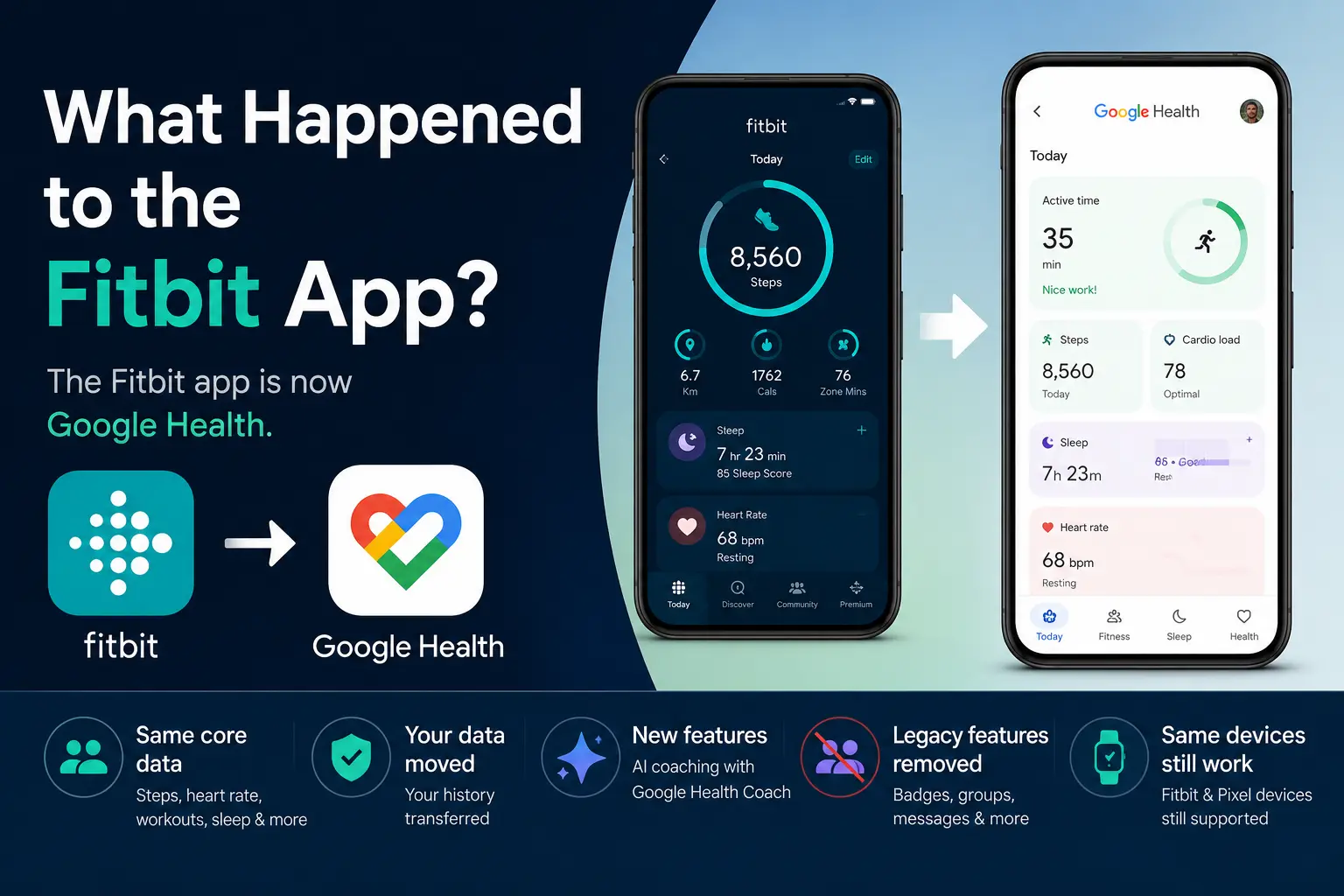
The Fitbit app was rebranded as the Google Health app on May 19, 2026, and the rollout reached Android and iOS users by May 26. Core data like steps, heart rate, workouts and sleep carried over to the new app, while Google removed legacy features such as badges, direct messaging and Sleep Profile.
Long story short
Google has owned Fitbit since acquiring the company in 2021, and has been folding it into its larger health ecosystem ever since. One major sign came in 2023, when Google began requiring new Fitbit sign-ups to use a Google Account instead of a standalone Fitbit login. Google also removed several classic Fitbit social features that year, including Open Groups, Challenges and Adventures, along with related trophies. The Fitbit app becoming Google Health was the biggest visible step in that transition.
Starting May 19, 2026, users could no longer access Fitbit with a standalone Fitbit account and needed to move their account to Google to continue using the app. That same date also marked the start of the Fitbit app's rebrand into Google Health. Google announced the change alongside the Fitbit Air, signalling that the Fitbit hardware brand would live on even as the software brand shifted under Google Health. By May 26, 2026, the redesigned Google Health app was broadly available on Android and iOS in the form of an update (version 5.0). Google also alluded to the fact that the separate Google Fit experience would be folded into Google Health later in 2026.
Your core Fitbit data did not disappear. Steps, workouts, heart rate, sleep and other core activity data still live in your account. Existing Fitbit devices and Pixel Watches still pair through the Google Health app.
What changed is the app UI/UX, the account requirement, the subscription name and a sizable list of legacy Fitbit features.
What are the biggest differences?
The core tracking features did not disappear. Steps, heart rate, sleep, workouts and other daily health metrics still transfer over to the rebranded Google Health app.
The bigger change is how the app is organized into four main tabs:
- Today
- Fitness
- Sleep
- Health
Google says the redesign is meant to bring fitness, sleep, health trends, third-party app data and medical records into one place. Though, not all have welcomed the changes with several users on Reddit expressing difficulties adjusting to the new functionality. The app can connect data from sources like Health Connect, Apple Health and other supported third-party apps.
The other major change is AI coaching. Google Health Coach, built with Gemini, is included with Google Health Premium, which replaced Fitbit Premium. The subscription costs $9.99 per month or $99.99 per year, and Google AI Pro and Ultra subscribers get Google Health Premium at no extra cost.
Fitbit vs. Google Health
| Feature | Fitbit app | Google Health app |
|---|---|---|
| Core tracking | Yes | Yes |
| Fitbit device pairing | Yes | Yes |
| Premium subscription | Fitbit Premium | Google Health Premium |
| AI coaching | Limited or separate coaching features | Google Health Coach with Premium |
| Badges | Yes | Removed; historical badges are being deleted |
| Groups and Community Feed | Yes | Removed |
| Direct messages | Yes | Removed |
| Friends leaderboard | Steps-focused | Weekly friends leaderboard with steps and Cardio Load |
| Sleep Profile / sleep animals | Yes for Premium users | Removed |
| Estimated Oxygen Variation | Yes | Removed; SpO2 data shown instead |
| Web/API ecosystem | Fitbit Web API | Transitioning towards Google Health API |
What Fitbit features were removed?
The biggest losses are older Fitbit social and motivational features. Badges are no longer supported, Groups and Community Feeds are removed and direct messages are gone.
The leaderboard was not removed entirely, but it changed. Google Health now supports a weekly friends leaderboard based on steps or Cardio Load.
Google also removed or changed several health and Premium features:
- Sleep Profile and monthly sleep animals
- Estimated Oxygen Variation
- Snore Detection for Fitbit Sense and Versa 3
- Sleep Sensitivity settings
- Minute-by-minute skin temperature data
- Stress Score, replaced by Resilience
- Food Plans calorie targets
- Premium recipes
Should I export my Fitbit data?
It depends on what features you engaged with on the Fitbit app. Your core steps, heart rate, sleep and workout history is transferring over, so if that's your primary concern, you're covered. The main reason to export is to keep a copy of legacy Fitbit data tied to features that are being removed, such as some of the social ones.
If you still have an old Fitbit login or want a copy of your Fitbit archive, export your data before Google begins processing data deletions on July 15, 2026. Google says users can still download or delete their data before that date.
To export a complete archive of your Fitbit account data:
- Go to the Fitbit settings page.
- Select Data Export.
- Choose Export Your Account Archive.
- Request your data.
- Confirm the export request from your email.
- Download the archive when Google sends the link.
Google notes that large account archives can take a few days to generate.
What happens to my Fitbit data on other apps?
If you connect a third-party app like Sonar to pull in wearable data, that connection draws from your live activity data rather than the features being retired, so it should keep working. Exporting your archive is still the safest way to keep a full personal copy of everything.
Frequently Asked Questions (FAQ)
Did Google delete my Fitbit data?
Google did not delete core Fitbit tracking data as part of the app change. Your steps, sleep, heart rate and workout history should remain tied to your account. However, data connected to removed features may be deleted, and users should export their Fitbit archive if they want a full copy.
Why did my Fitbit app icon change?
Your Fitbit app icon changed because Google updated the Fitbit app into Google Health. The app now has a new name, new logo, new layout and new features.
If you search for "Fitbit" in the App Store or Google Play, you may now see the app listed as Google Health. Google's app listings describe it directly: "The Fitbit app is now Google Health."
Does Google Health work with Apple Health?
Yes, but this does not mean Fitbit has a direct two-way sync with Apple Health.
Google says the Google Health app can pull in data from Apple Health, Health Connect on Android and other supported third-party apps. That means Google Health can bring in your Apple Health metrics, but what's actually available depends on your device, app permissions and the specific type of metric.
Do I need a Google account now?
Yes. After May 19, 2026, users can no longer access Fitbit with a standalone Fitbit account. To continue using the app, you need to move your Fitbit account to a Google Account, a step Google outlines in its Help Center. Google also requires a Google Account to sign up for Google Health and to activate newly released Fitbit and Pixel devices.
If you already migrated your Fitbit account before the deadline, your account and data continue inside Google Health with no extra steps. If you did not migrate, sign in with your old Fitbit account and complete the move to a Google Account before you can use the app.
About Sonar
Your body is talking. Are you listening? Sonar unifies all of your wearables, lifestyle, and biomarker data to unlock personalized insights and detection once reserved for elite athletes and biohackers. Trusted by 250,000+ users across 170+ countries, Sonar helps you cut through the noise across sleep, recovery, stress, activity, and nutrition - so you can focus on what actually matters. Sonar isn't just another health tracker. Launched out of Columbia University in New York, it merges the latest medical, sports and data science with AI engines that continuously surface subtle shifts and patterns across millions of data points, helping you know when to push, when to pause, and where to focus next.
More to Explore
June 23, 2026
June 16, 2026
Get the latest from Sonar
Share your email to stay up-to-date with all things Sonar
- English (Canada)
- Bahasa Indonesia
- Bahasa Melayu
- Català
- Čeština
- Dansk
- Deutsch
- English
- English (Australia)
- English (UK)
- Español (España)
- Español (Latinoamérica)
- Español (México)
- Français
- Français (Canada)
- Hrvatski
- Italiano
- Magyar
- Nederlands
- Norsk
- Polski
- Português (Brasil)
- Português (Portugal)
- Română
- Slovenčina
- Slovenščina
- Suomi
- Svenska
- Tiếng Việt
- Türkçe
- Ελληνικά
- Русский
- Українська
- עברית
- العربية
- हिन्दी
- ไทย
- 한국어
- 日本語
- 简体中文
- 繁體中文
EN