
How to Sync MyFitnessPal With Apple Health
Quick Answer
To sync MyFitnessPal with Apple Health, open the MyFitnessPal app and tap More, then Settings, then Sharing & Privacy, then HealthKit Sharing. Grant permission for the data and metrics you want to share. Once connected, MyFitnessPal sends meal summaries and weight to Apple Health while Apple Health sends back same-day workouts, weight and sleep data.
Getting these two apps talking to each other closes a gap that a lot of people run into. MyFitnessPal is built for food logging and macro tracking. Apple Health is built to collect everything else, from steps to sleep to heart rate. Connect them and your calorie budget will start reflecting your actual activity instead of a flat estimate. Generally, the same sync mechanics apply whether you're connecting MyFitnessPal, Garmin Connect or another wearable app.
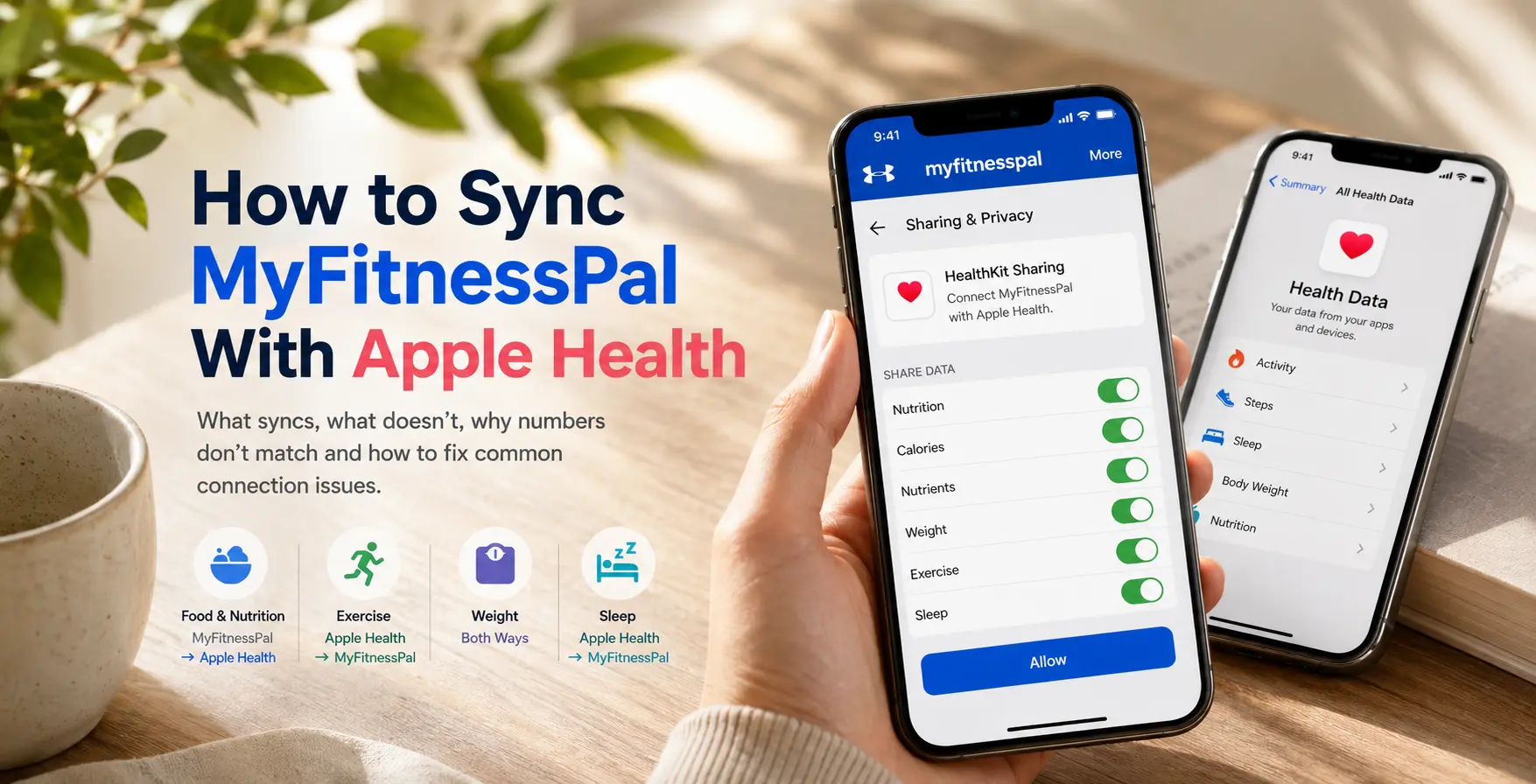
Setting up the connection
The sync happens through Apple's HealthKit framework, which lets compatible third-party apps read and write data to Apple Health. If you have not connected the apps before, start inside MyFitnessPal.
Steps to sync MyFitnessPal with Apple Health
- Open MyFitnessPal on your iPhone
- Tap More
- Tap Settings
- Tap Sharing & Privacy
- Tap HealthKit Sharing
- Turn on the data categories you want to share
- Tap Allow
That last point trips people up. Apple only shows the full data type picker the first time you authorize HealthKit Sharing. After that, permission changes live in iOS Settings rather than the app itself.
How to check or change Apple Health permissions after setup
After the first setup, you may not see the same connection screen inside MyFitnessPal. That does not always mean the sync is broken. It usually means the connection has already been initialized and Apple Health permissions now need to be managed through your iPhone.
To check or change permissions:
- Open the Settings app on your iPhone
- Tap Health
- Tap Data Access & Devices
- Tap MyFitnessPal
- Turn each permission on or off
Apple also lets you manage app access from the Health app. Open Health, tap your profile, choose Apps or Devices under Privacy, then select the app you want to adjust.
What data actually moves and in which direction
Not everything syncs both ways. This is where most confusion comes from, so it helps to see it laid out plainly.
| Data type | Sync direction | What to know |
|---|---|---|
| Food and nutrition | MyFitnessPal to Apple Health | MyFitnessPal sends meal summaries, calories and some nutrients to Apple Health. It does not pull food from Apple Health into MyFitnessPal. |
| Exercise | Apple Health to MyFitnessPal | Exercises logged in Apple Health can sync to MyFitnessPal if they were logged the same day. Exercise does not transfer from MyFitnessPal to Apple Health. |
| Weight | Both directions | Weight can update between MyFitnessPal and Apple Health in both directions. |
| Sleep | Apple Health to MyFitnessPal | If sleep data is already in Apple Health, MyFitnessPal says users can view that sleep information in the MyFitnessPal app. |
Why the numbers sometimes don't match
A few things cause the two apps to disagree even after a successful connection:
- Same-day only exercise sync. If you open MyFitnessPal after midnight, yesterday's workout won't come through. That's expected behaviour, not a bug.
- Multiple data sources. If more than one app or device writes to the same category in Apple Health, such as steps from both a watch and a phone, MyFitnessPal may only pull from whichever source Health prioritizes. Apple explains how it ranks sources in its guide to managing Health data, with manually entered data ranked first, followed by your iPhone or Apple Watch, then connected apps.
- No historical backfill. MyFitnessPal only pulls data logged after you connect the two apps. It won't reach back and import your workout history from before the link was made.
- Reinstalling the app. If MyFitnessPal is removed and reinstalled while troubleshooting, log back in with the same account, confirm your data has synced back from MyFitnessPal's servers and re-link Apple Health.
Troubleshooting the connection
Start with the simple fixes first.
- Check permissions in iPhone Settings. Go to Settings, then Health, then Data Access & Devices, then MyFitnessPal, and make sure the right categories are turned on. This is the best place to check permissions after the first-time MyFitnessPal setup has already been completed.
- Open both apps. Open MyFitnessPal, then open Apple Health. Sometimes data does not appear until both apps have had a chance to refresh.
- Review Apple Health data sources. In Apple Health, open the category that looks wrong, scroll to Data Sources & Access and check which source is listed first. Apple says you can reorder sources if more than one app or device contributes to that category.
- Avoid multiple MyFitnessPal accounts on one iPhone. MyFitnessPal warns that Apple Health does not distinguish between multiple MyFitnessPal accounts used on the same device. If different people log in and out of the app on one iPhone, data can mix or overwrite.
If a workout still isn't showing up after checking permissions, try logging a small test workout manually in Apple Health. If that syncs to MyFitnessPal within a few minutes, the connection is working and the original issue was likely a one-off.
Frequently Asked Questions (FAQ)
Does MyFitnessPal sync macros to Apple Health?
Yes, sort of. MyFitnessPal sends calories and some nutrients to Apple Health as part of its meal summaries. The company doesn't publish a full list of which nutrients make the trip, but it has confirmed caffeine and vitamin A are excluded.
Can Apple Health send food data into MyFitnessPal?
No. MyFitnessPal says food data does not transfer from Apple Health into MyFitnessPal. Food sync works from MyFitnessPal to Apple Health.
Why are my Apple Watch calories different in MyFitnessPal?
The two apps sometimes calculate active calories differently, and MyFitnessPal may round or adjust workout entries once they're logged. Small discrepancies between the two are normal and shouldn't affect the accuracy of your food log.
About Sonar
Your body is talking. Are you listening? Sonar unifies all of your wearables, lifestyle, and biomarker data to unlock personalized insights and detection once reserved for elite athletes and biohackers. Trusted by 250,000+ users across 170+ countries, Sonar helps you cut through the noise across sleep, recovery, stress, activity, and nutrition - so you can focus on what actually matters. Sonar isn't just another health tracker. Launched out of Columbia University in New York, it merges the latest medical, sports and data science with AI engines that continuously surface subtle shifts and patterns across millions of data points, helping you know when to push, when to pause, and where to focus next.
More to Explore
July 3, 2026
June 23, 2026
Get the latest from Sonar
Share your email to stay up-to-date with all things Sonar
- English (Canada)
- Bahasa Indonesia
- Bahasa Melayu
- Català
- Čeština
- Dansk
- Deutsch
- English
- English (Australia)
- English (UK)
- Español (España)
- Español (Latinoamérica)
- Español (México)
- Français
- Français (Canada)
- Hrvatski
- Italiano
- Magyar
- Nederlands
- Norsk
- Polski
- Português (Brasil)
- Português (Portugal)
- Română
- Slovenčina
- Slovenščina
- Suomi
- Svenska
- Tiếng Việt
- Türkçe
- Ελληνικά
- Русский
- Українська
- עברית
- العربية
- हिन्दी
- ไทย
- 한국어
- 日本語
- 简体中文
- 繁體中文
EN