
How to Sync Strava to Apple Health
Quick answer
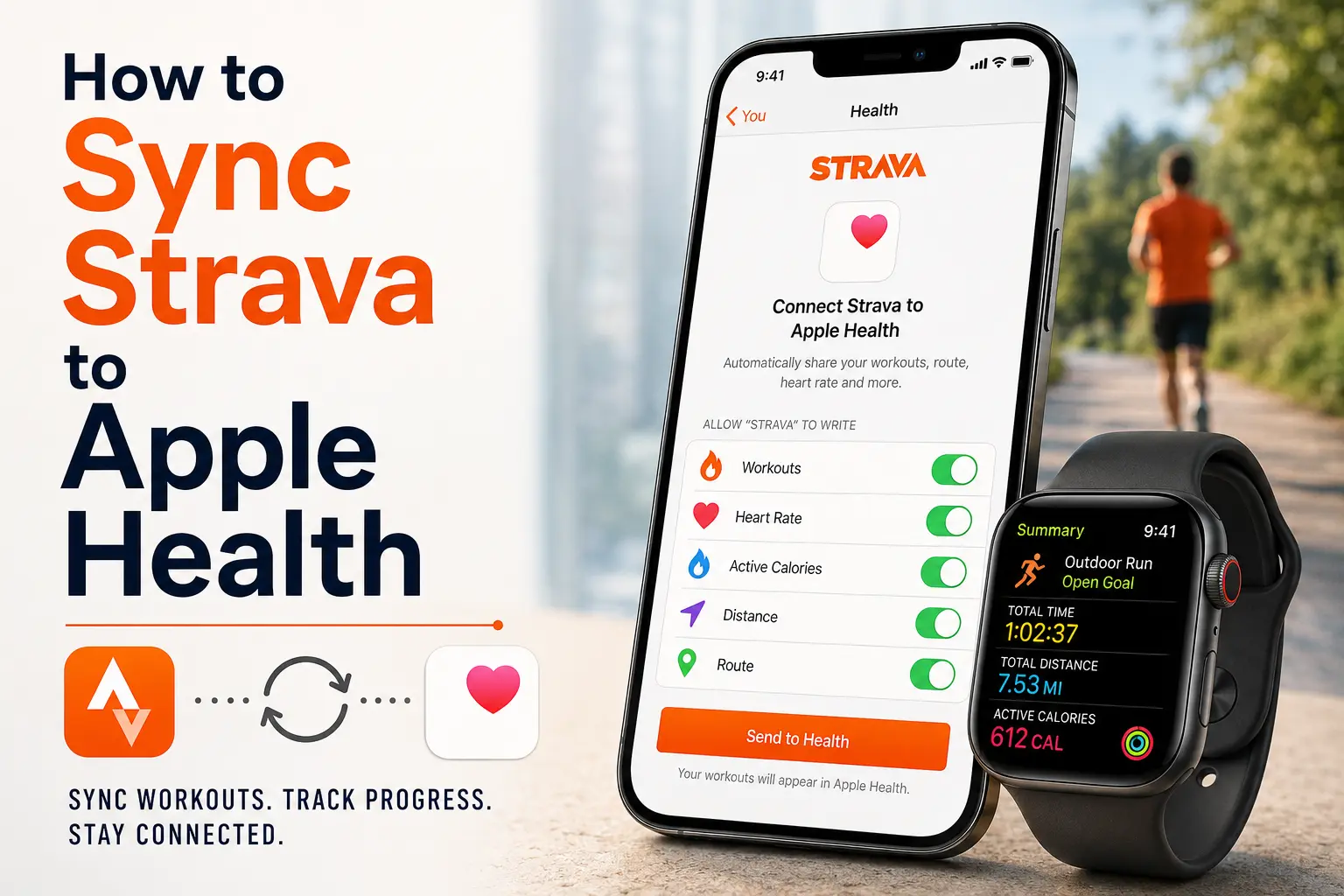
Open Strava, tap the You tab, then go to Settings > Manage Apps and Devices > Health and connect it to Apple Health. On the Health Access screen, turn on the data types you want shared. Strava requires Workouts to be turned on before any activity data like running, cycling, calories or distance can sync correctly.
Once connected, Strava can automatically send workout data to Apple Health, including activity type, distance, time, calories and route information. Route data from third-party activities, such as Garmin or Zwift workouts uploaded into Strava, generally don't make the trip over.
Does Strava sync with Apple Health?
Yes, Strava can sync workout data directly with Apple Health on iPhone. After you connect the two apps, eligible activities automatically appear in Apple Health without needing to worry about GPX files or using a third-party app.
The one thing worth understanding upfront is that the sync isn't unlimited. Strava and Apple Health share workout data without much complexity, but how much detail actually comes through often depends on where the activity was recorded in the first place.
Strava's support article covers the official setup process step by step. It's also worth checking Apple's own guide to managing Health data and connected apps, since that's where you'll go if you ever need to change what Strava is allowed to read or write.
How to sync Strava to Apple Health
Setup takes about two minutes on your iPhone.
- Open the Strava app.
- Tap the You tab.
- Tap the settings icon in the upper corner.
- Select Manage Apps and Devices.
- Tap Health.
- Tap the plus sign or Connect.
- When the Apple Health permissions screen opens, choose what Strava can read and write.
- Turn on Workouts.
- Turn on any other categories you want to share.
- Go back to Strava and turn Send to Health on.
Once that's done, new eligible Strava activities should start showing up in Apple Health on their own.
What Data Actually Syncs Over
Strava can send various workout data into Apple Health once the two apps are connected.
| Data type | Syncs? | Notes |
|---|---|---|
| Distance, duration and calories | Yes | Basic workout metrics can transfer once Workouts permission is enabled. |
| Heart rate | Yes | Requires Heart Rate sharing to be enabled in Apple Health permissions. |
| Route and GPS data | Usually | Route data from activities imported into Strava from Garmin, Zwift or other third-party services may not transfer to Apple Health. |
| Cycling cadence, cycling power and running power | Yes | Requires compatible hardware and supported versions of iOS, watchOS and Strava. |
| Activities older than 30 days | No | Strava only imports eligible recent Apple Watch workouts from Apple Health. |
The cleanest sync tends to happen when an activity is recorded directly in Strava or on an Apple Watch, then passed along through the official Health connection. Anything routed through a third-party app first risks losing some detail along the way.
How to connect Apple Watch workouts
This is the reverse direction, but it matters for a lot of users.
If you record workouts using the Apple Watch's native Workout app, Strava can pull those in from Apple Health. The catch is timing. Strava says only Apple Watch Workout app activities recorded within the past 30 days are eligible to sync into Strava. In addition, workouts that were uploaded into Apple Health from another third-party app will not sync from Health to Strava.
To turn this on:
- Open Strava.
- Go to You > Settings > Manage Apps and Devices > Health.
- Turn on Automatic Uploads.
Or skip automatic syncing and manually import individual workouts as they show up instead. This setup works well if you like recording on your Apple Watch but still want everything to land in your Strava feed too.
Fixing Common Sync Issues
If you've set everything up and activities still aren't showing up where they should, give these common troubleshooting tips a try:
- Check permissions directly in Health: go to Sharing, then Apps, then Strava and confirm Workouts and Heart Rate are both switched on
- Force close both apps, then reopen Strava and scroll through your You feed to trigger a refresh
- Restart your iPhone and Apple Watch if the sync has been stuck for a while
- Turn off low power mode on your watch under Settings, Workout, Low Power Mode, since it can delay syncing after extended use
- If permissions look correct but nothing changes, disconnect the integration in both apps and reconnect from scratch
Frequently Asked Questions (FAQ)
Why is my Strava workout not showing in Apple Health?
Check that Strava has permission to write Workouts in Apple Health. Also confirm that Send to Health is turned on in Strava. If the activity came from Garmin, Zwift or another third-party app, some data may not sync into Apple Health.
Does Strava sync heart rate to Apple Health?
It can, but it depends on your device, the workout source and your Apple Health permissions. Open Apple Health, go to your profile, tap Apps, select Strava and review the available heart rate permissions.
How do I stop duplicate workouts between Strava and Apple Health?
Duplicate workouts usually happen when the same activity is recorded in more than one app. For example, if you start a run in both the Apple Watch Workout app and Strava, each app may write its own workout to Apple Health. The easiest way to prevent duplicates is to use one app as your primary workout recorder.
Will my old Strava activities show up in Apple Health automatically?
No. Native sync only covers activities going forward from when you enable it. Older workouts need to be imported separately through a GPX tool after requesting your Strava data archive.
Does Strava syncing affect my Apple Watch activity rings?
Yes. Once connected, calories, duration and other workout data from Strava count toward your Move and Exercise rings.
Related Apple Health Integration Guides
Looking to connect other fitness or nutrition apps? These step-by-step guides walk through the most popular Apple Health integrations.
About Sonar
Your body is talking. Are you listening? Sonar unifies all of your wearables, lifestyle, and biomarker data to unlock personalized insights and detection once reserved for elite athletes and biohackers. Trusted by 250,000+ users across 170+ countries, Sonar helps you cut through the noise across sleep, recovery, stress, activity, and nutrition - so you can focus on what actually matters. Sonar isn't just another health tracker. Launched out of Columbia University in New York, it merges the latest medical, sports and data science with AI engines that continuously surface subtle shifts and patterns across millions of data points, helping you know when to push, when to pause, and where to focus next.
More to Explore
July 9, 2026
July 3, 2026
Get the latest from Sonar
Share your email to stay up-to-date with all things Sonar
- English
- Bahasa Indonesia
- Bahasa Melayu
- Català
- Čeština
- Dansk
- Deutsch
- English (Australia)
- English (Canada)
- English (UK)
- Español (España)
- Español (Latinoamérica)
- Español (México)
- Français
- Français (Canada)
- Hrvatski
- Italiano
- Magyar
- Nederlands
- Norsk
- Polski
- Português (Brasil)
- Português (Portugal)
- Română
- Slovenčina
- Slovenščina
- Suomi
- Svenska
- Tiếng Việt
- Türkçe
- Ελληνικά
- Русский
- Українська
- עברית
- العربية
- हिन्दी
- ไทย
- 한국어
- 日本語
- 简体中文
- 繁體中文
EN