
How Sports Teams Can Use AI to Analyse Athlete Wearable Data with Sonar Atlas
Your athletes generate more data than your team has time to review. Sonar Atlas brings it together, uses AI to surface what matters and helps coaches turn wearable data into better coaching outcomes.
As a coach, trainer, or sports scientist, you already know what good monitoring looks like. The hard part is doing that across a whole squad. One client syncs a Garmin. Another logs meals in MyFitnessPal. A third wears an Oura ring and never opens the app to check it. None of those numbers talk to each other on their own and by the time you've pulled them into a spreadsheet, the moment to act on them has usually passed.
Sonar Atlas brings scattered, wearable data from an entire squad into one athlete intelligence platform. Coaches can scan team-wide trends, analyse a single athlete's profile or ask Sonar AI a question in plain language to better understand performance.
Start with one reliable view of the squad
AI analysis is only as good as the data underneath it. If one athlete trains with a Garmin, another wears an Oura ring and a third logs meals in MyFitnessPal, coaches shouldn't need three separate logins just to compare trends.
Sonar Atlas syncs data from more than 600 wearables, apps and devices, including Apple Health, Google Health, Garmin, Oura and Strava. Sleep, workouts, recovery, nutrition, records and biomarkers all land in the same system from there.
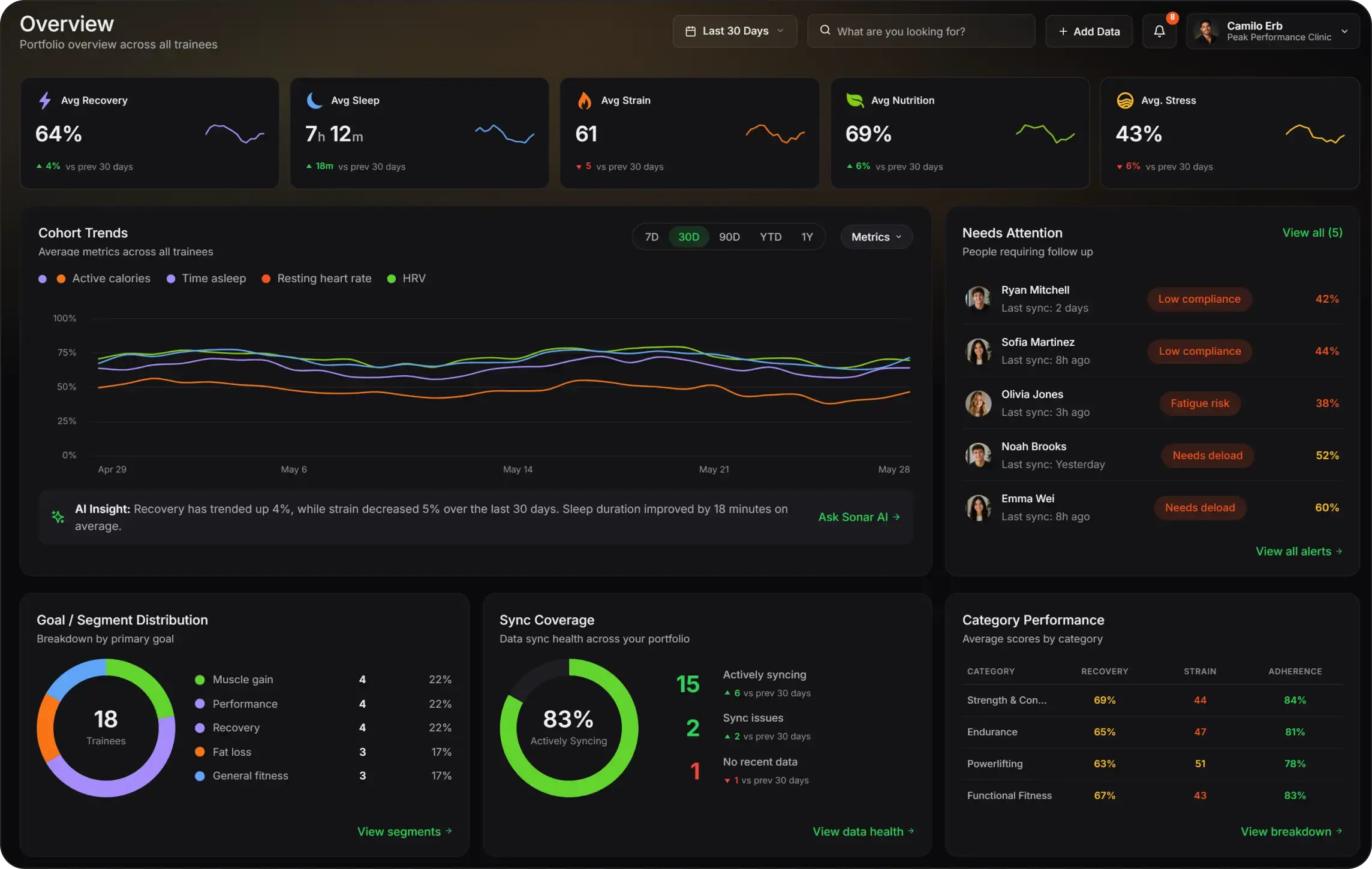
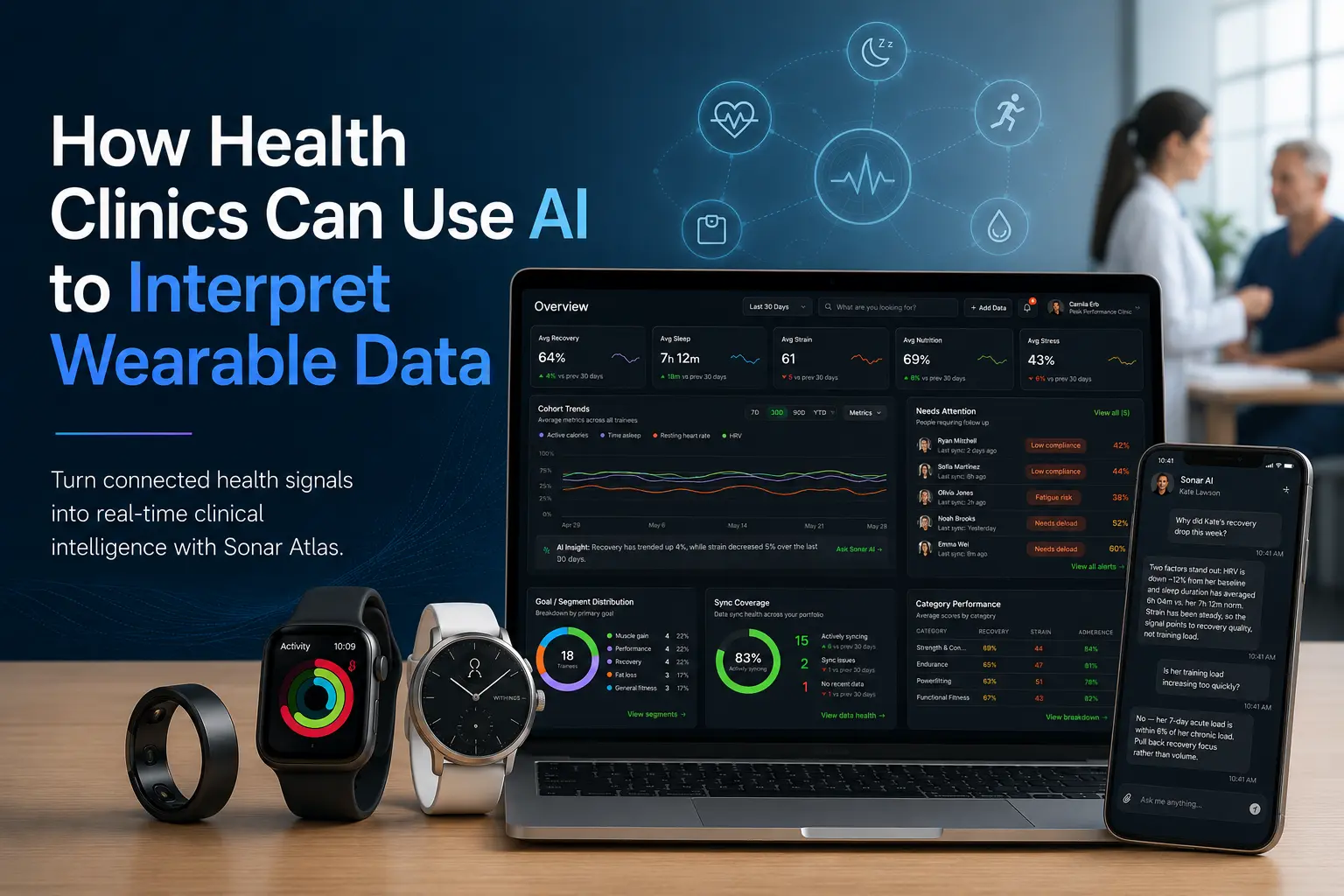
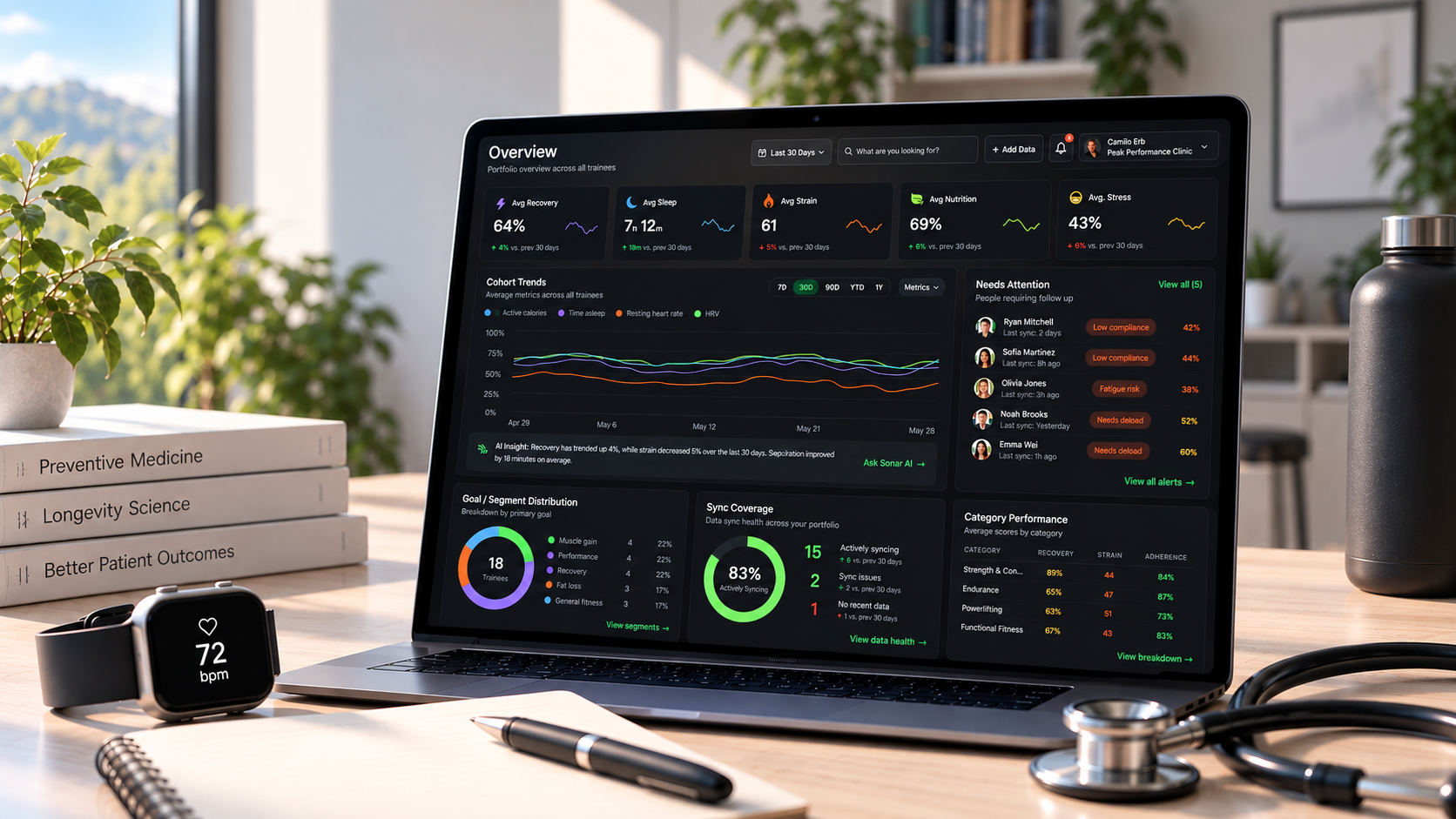
The Overview section gives trainers a real-time snapshot of the entire squad: average Recovery, Sleep, Strain, Stress and Nutrition for the period selected, cohort trends over time, sync coverage across every connected device, and the athletes who need follow-up first. All of the analysis you need is present in a digestible format.
Ask which athletes need attention today
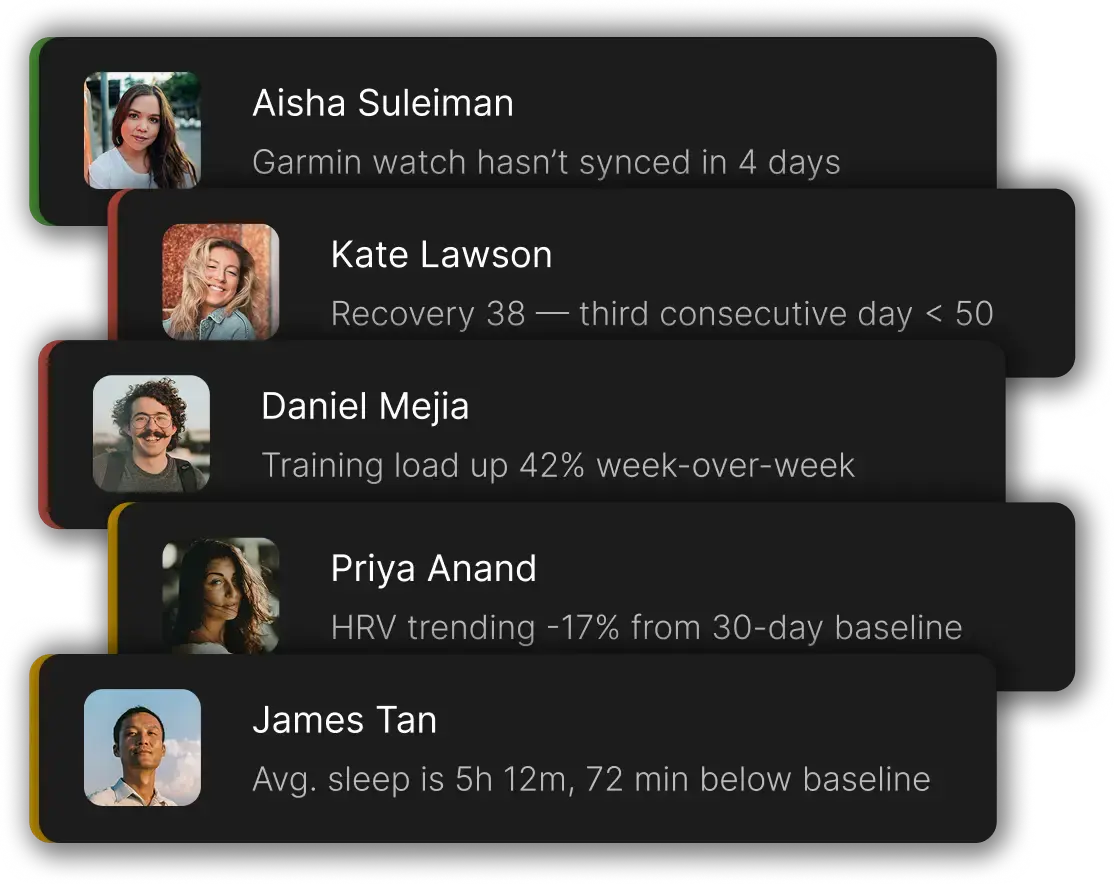
A morning review usually starts with one operational question: where should staff look first? Sonar AI can open every active alert on the squad and sort it by priority, so a coach starts with the exceptions instead of checking each profile one by one.
"Which athletes have had a recovery score under 50 for three days in a row?"
"Show me anyone whose HRV has dropped more than 15% below their baseline this week."
"Who hasn't synced their wearable in the last few days?"
"Which athletes had the sharpest week-over-week jump in training load?"
Each answer comes back as an alert card outlining the concern. Staff can open the athlete's profile to confirm the source data before deciding on a training adjustment.
Ask why an athlete's recovery changed
An alert tells a coach what changed. The next question is almost always why. Sonar AI can pull an athlete's related trends into one place so staff can look at the pattern instead of opening four separate charts.
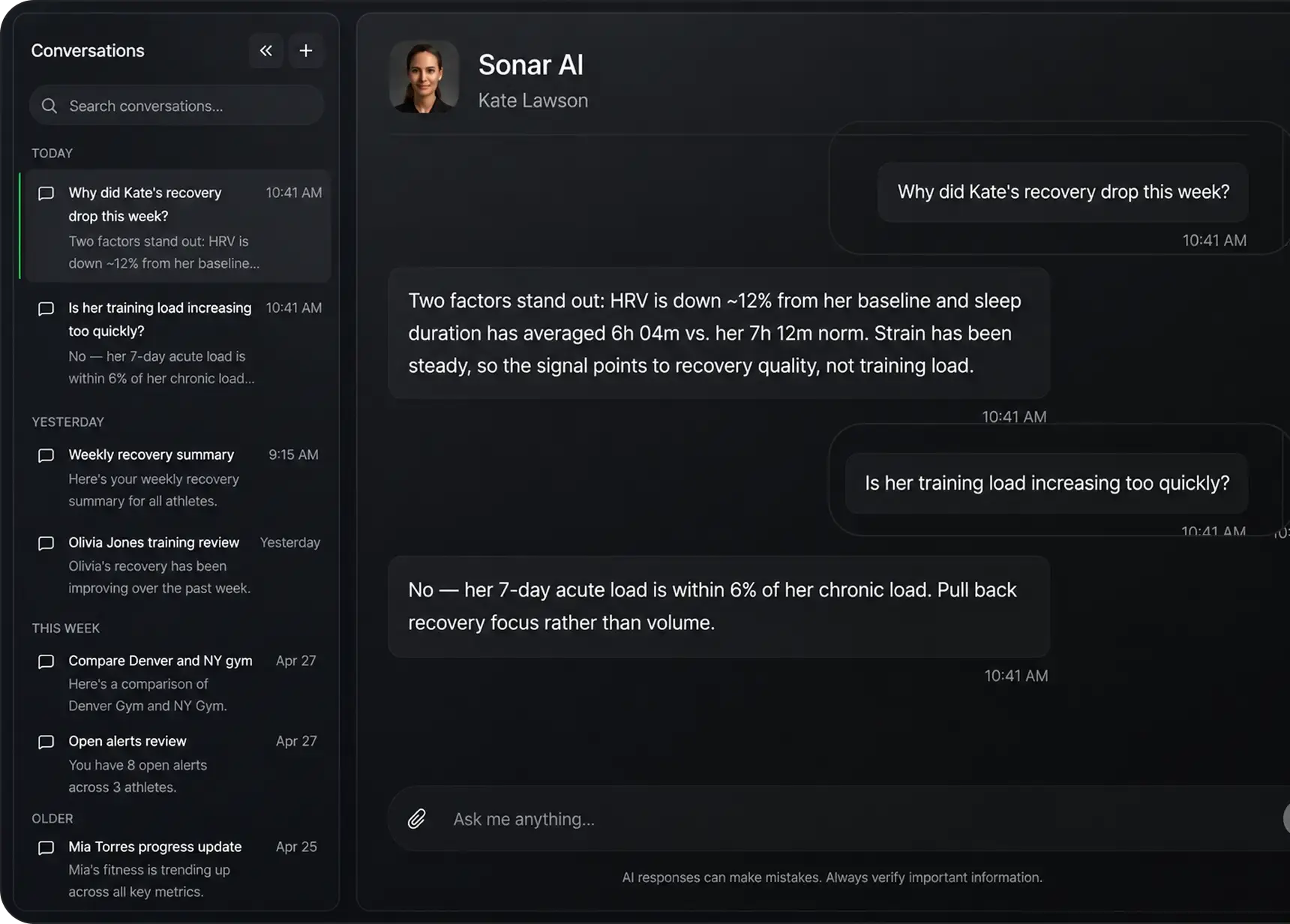
"Why did Kate's recovery drop this week?"
"Is her training load increasing too quickly?"
For an athlete like Kate, the first question returns an explanation rather than just a number. Her HRV is about 12% below baseline and she is averaging 6 hours 4 minutes of sleep compared with her usual 7 hours 12 minutes, while training strain has remained steady. Together, those signals suggest the issue is more likely recovery quality than workload.
A follow-up question can test that assumption directly. Sonar AI can show that her 7-day acute training load is within 6% of her chronic load, making a sudden increase in volume less likely. That gives staff a clearer reason to focus on recovery adjustments rather than automatically reducing the week's training load.
The conversation stays in one thread. A coach can follow up with "now show HRV too" or "compare that with last week" and Sonar AI keeps the earlier context, so the review moves forward instead of restarting each time.
Ask for trends in the format you need
Different roles want different outputs. A sports scientist may want a chart that shows direction. An physiotherapist may want a short squad-level summary. A coach prepping for an athlete meeting may want the exact daily numbers.
"Chart Mia Torres's recovery for the last 30 days and shade in her typical range."
"Give me a table of Jordan's exact daily sleep scores for the past two weeks, not an average."
"Summarise recovery, resting heart rate and HRV for Sam heading into Friday's session."
Sonar AI can pair a written explanation with an interactive chart, trend panel, athlete card or expandable table, depending on the question. When a metric is plotted over a specific time period, Atlas can also shade the athlete's typical range behind the trend line. This makes it easier to interpret changes in the context of what is normal for that individual rather than relying on a generic target.
Ask about workouts and training volume
Wearable data is most useful once coaches can connect an athlete's response with the work they actually did. Sonar AI can pull recent workouts, complete with activity type, duration, distance, calories, strain and heart rate, and it can roll that up into a longer training volume summary.
"Pull up Alex's workouts from the past two weeks, sorted by strain."
"Summarise Alex's training volume over the last 90 days against the 90 days before that."
"Which of Alex's sessions this month had the highest average heart rate?"
A useful approach is to start with the recent activity list, then drill into the session that warrants a closer look. What once required a weekly spreadsheet review can now be handled with a few direct questions, giving staff a consistent way to compare the intended training plan with what athletes' wearables actually recorded.
Compare athletes without building another report
Squad comparisons help teams decide where to look next. They're a starting point for investigation, not a scoreboard for who's the better athlete. Sonar AI can compare people on a chosen metric so coaches can see who's trending up, who may be struggling and where an athlete differs.
"Rank the squad by recovery improvement over the last 30 days."
"Who had the largest drop in average sleep this week?"
"Surface the 5 athletes who need the most attention this week and recommend individual solutions"
For the ranking to be useful, the question should include both a metric and a time range. Without that context, the results can create more noise than clarity. For broader group analysis, staff can also filter the Atlas Overview by category or goal, narrow the view to the relevant cohort, then open an individual athlete profile for a closer look.
How does Sonar Atlas combine data from multiple devices and apps?
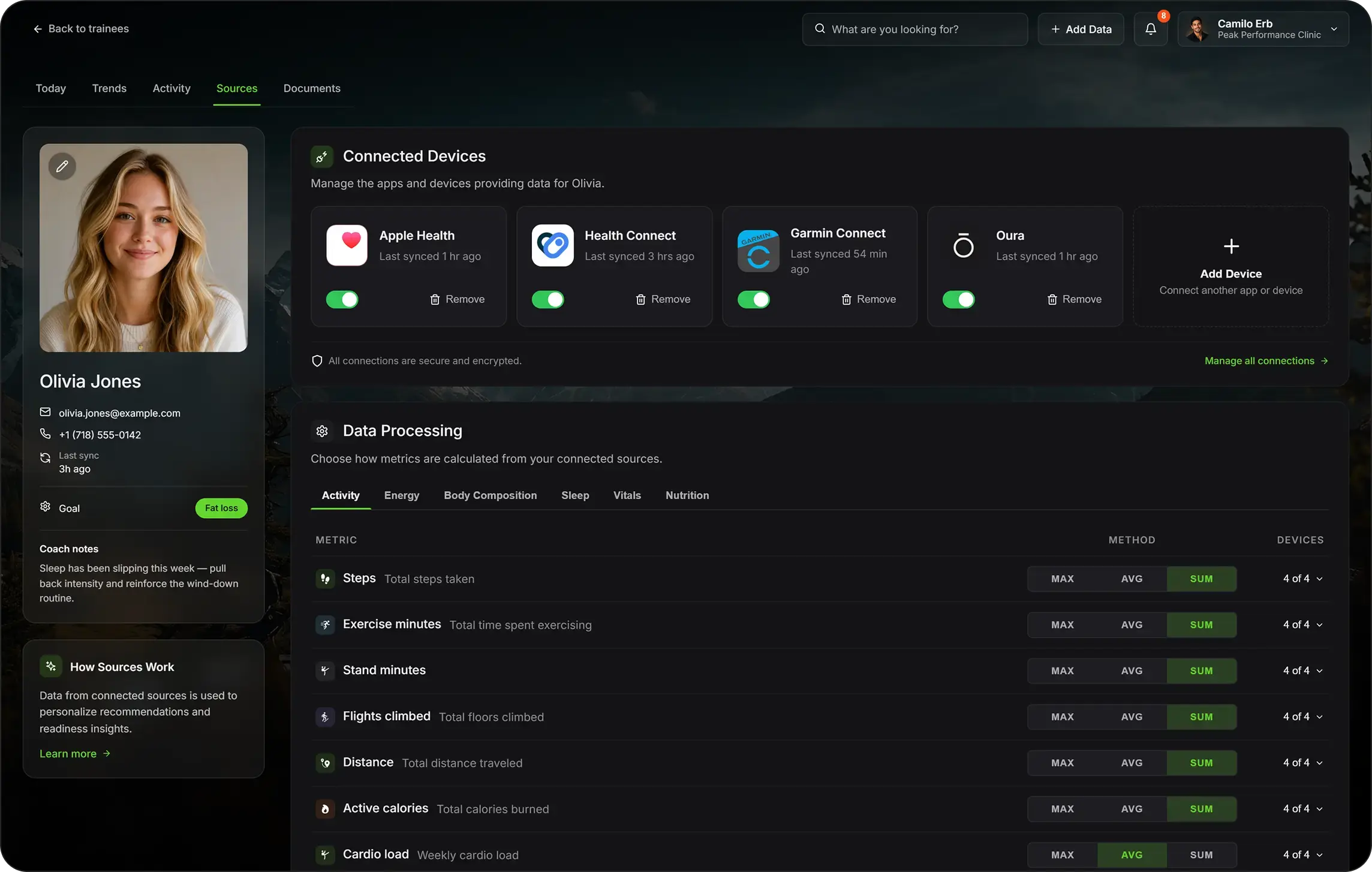
An athlete might track activity with an Apple Watch, sleep with an Oura ring and do nutrition in a third app. In the Sources tab of an athlete's profile, Atlas shows every connected device, when it last synced and whether it is actively contributing data. All connections are encrypted.
When multiple devices report the same metric, staff can control how Atlas combines those readings by choosing Sum, Average or Max for each metric. Steps and exercise minutes, for example, may be summed across connected devices, while a rolling metric like weekly cardio load may be averaged. The panel also shows how many devices are contributing to each number, making it easier to understand whether a metric comes from a single source or several.
That processing gives Sonar AI a cleaner foundation for athlete wearable data analysis. Instead of working across separate exports, it analyses the data already brought together in Atlas. If a number looks off, staff can use the Sources tab to check for sync gaps or outlier devices before deciding how much weight to give the reading.
Make AI part of the sports science workflow
Sonar AI works best as part of a consistent coaching workflow. It can help teams get to the right question faster, while coaches and practitioners still decide what the answer means in the context of each athlete's plan.
Morning squad review
Ask who needs attention, check the highest-priority alerts and look for sync issues before adjusting the day's session plan.
Pre-session athlete review
Ask for an athlete's daily snapshot, then look at sleep, recovery and recent training. Follow up once you've found a change worth a conversation.
Weekly player performance meeting
Ask for training volume over the last 30 or 90 days, compare it with the period before and review any athlete whose trend has moved outside their normal range.
Programme and cohort review
In the Overview section, filter by the relevant category or goal, review the group trend, then use Sonar AI to identify which individual athletes are driving the change.
Want to see it in action?
Explore Atlas and book a demo to learn how Sonar can help your clients or athletes reach better outcomes.
About Sonar
Your body is talking. Are you listening? Sonar unifies all of your wearables, lifestyle, and biomarker data to unlock personalised insights and detection once reserved for elite athletes and biohackers. Trusted by 250,000+ users across 170+ countries, Sonar helps you cut through the noise across sleep, recovery, stress, activity, and nutrition - so you can focus on what actually matters. Sonar isn't just another health tracker. Launched out of Columbia University in New York, it merges the latest medical, sports and data science with AI engines that continuously surface subtle shifts and patterns across millions of data points, helping you know when to push, when to pause, and where to focus next.
More to Explore
18 September 2026
18 September 2026
Get the latest from Sonar
Share your email to stay up-to-date with all things Sonar
- English (UK)
- Bahasa Indonesia
- Bahasa Melayu
- Català
- Čeština
- Dansk
- Deutsch
- English
- English (Australia)
- English (Canada)
- Español (España)
- Español (Latinoamérica)
- Español (México)
- Français
- Français (Canada)
- Hrvatski
- Italiano
- Magyar
- Nederlands
- Norsk
- Polski
- Português (Brasil)
- Português (Portugal)
- Română
- Slovenčina
- Slovenščina
- Suomi
- Svenska
- Tiếng Việt
- Türkçe
- Ελληνικά
- Русский
- Українська
- עברית
- العربية
- हिन्दी
- ไทย
- 한국어
- 日本語
- 简体中文
- 繁體中文
EN